
Customer feedback is one of the most powerful drivers of growth for Shopify stores. A Shopify post-purchase survey (PPS) helps you understand customer satisfaction and experience gaps immediately after checkout, delivery, or product usage. Sometimes, marketers also use a Shopify post-purchase survey to attribute marketing channels.
This step-by-step guide will show you how to create, set up, and automate a high-converting Shopify post-purchase survey, using no-code tools. You will learn to set up a fully automated customer feedback loop, leveraging the communication channels that your customers use.
Why Shopify Stores Need a Post-Purchase Survey
A Shopify post-purchase survey allows you to collect real customer insights while the experience is still fresh. Instead of guessing what worked or failed, you hear it directly from your buyers. It can be triggered immediately after an event (like a purchase or delivery), or sent with a lag (like 3 days after delivery). You can use a Shopify post-purchase survey to:
- Track customer loyalty (NPS)
- Measure customer satisfaction (CSAT)
- Identify browsing, checkout, or delivery issues
- Get feedback on product price and quality
- Understand purchase motivation
- Improve marketing channel attribution
With meaningful customer insights, you can improve your products, services, and processes. This leads to a better customer experience, which increases customer retention and boosts business growth.
Where to Show a Shopify Post-Purchase Survey
One of the key features of any good survey loop is a high response rate. To achieve this, it is important to show the survey at the right time, through the right channel. Shopify merchants generally use these three placements:
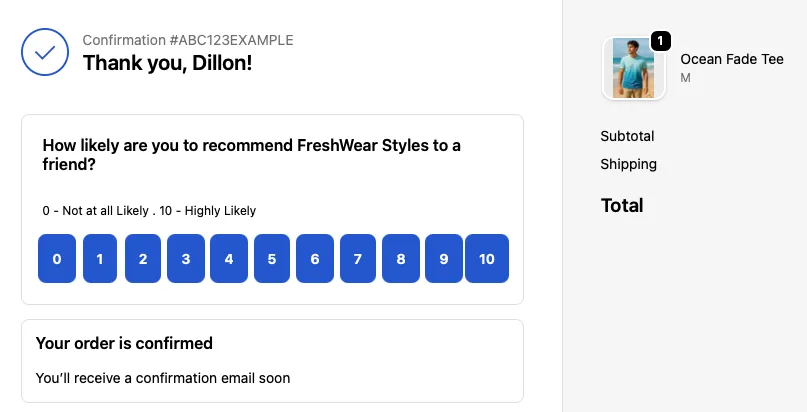
1. Thank You Page (Order Status Page) Survey
This is the highest-performing placement for one-question post-purchase surveys. Customers have just completed their order, making feedback instant and accurate. It is best suited to measure NPS/CSAT, understand the reasons for purchase, including feedback on website usage, pricing, and selection. It can also be used for marketing attribution.
2. Email Survey
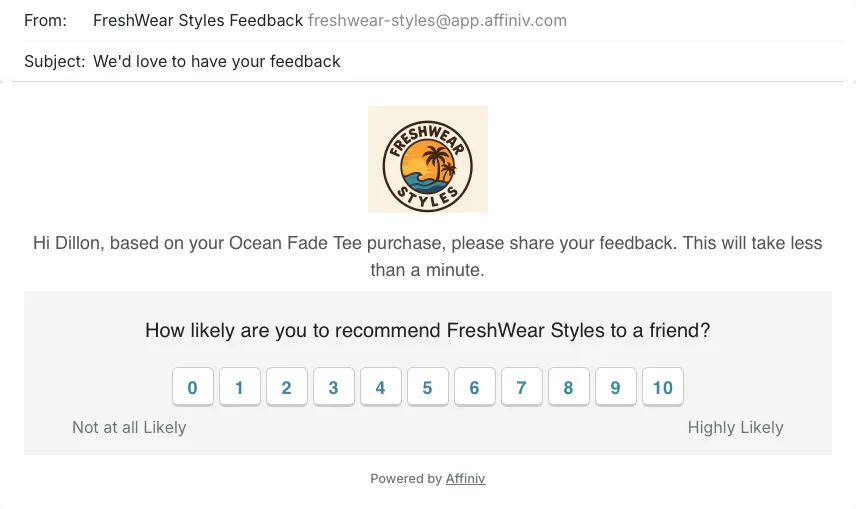
This is usually sent 3-4 days after product delivery, and is ideal for delivery experience or product-related feedback. Begin with a standard CX metric like NPS or CSAT and follow up based on customer response. Embed the primary survey question in the mail body to achieve a high response rate.
3. SMS/WhatsApp Survey
These are the most used communication channels by customers and give a higher response rate than email. Leverage them by creating mobile-friendly post-purchase surveys.
Use Affiniv Shopify Survey App to run Shopify post-purchase surveys on WhatsApp, SMS, Email, Thank You Page, and Order Status.
Step-by-Step Guide to Creating a Shopify Post-Purchase Survey
Here is a detailed 5-step guide to creating highly effective Shopify PPS.
Step 1: Define the Goal of Your Survey
Before creating your survey, decide what you want to learn. A clear goal leads to focused questions, a higher response rate, and accurate insights. Avoid clubbing multiple goals in a single survey. Some examples of survey goals are:
- Understand buying intent
- Get feedback on products
- Identify friction points in buying process
- Improve delivery experience
- Attribute marketing channels
- Measure customer loyalty
Defining the survey goal also helps you determine the right audience, timing, and channel of survey distribution.
Step 2: Choose the Right Survey Tool
You can create Shopify post-purchase surveys using (A) all-in-one no-code survey apps (fully automated), (B) email/SMS marketing apps (partial automation), or (C) workflow automation platforms (no dedicated analytics).
Option A: All-in-one No-code Survey Apps
This is the best way to fully automate your survey loop - from creation, customization, distribution, analysis, to post-response workflows.
- Affiniv One of the best Shopify post-purchase apps. You can create surveys like NPS, CSAT, etc., and distribute them via multiple channels, including WhatsApp, Email, SMS, and Thank You Page. It supports multi-lingual surveys and also works with Shopify POS. You get powerful reporting through an analytics dashboard and AI-driven actionable insights. Affiniv integrates seamlessly with your tech, marketing, and automation stacks without requiring any code. It has a free plan and offers free trials for all paid plans. It is known for its ease of use.
- Zigpoll A great Shopify PPS app. It is best for marketing attribution and abandoned cart surveys. It gives you a lot of templates for website-embedded surveys. But it does not support survey distribution via WhatsApp.
- Hulk NPS Another good Shopify post-purchase survey app. It offers multi-lingual support, provides an analytics dashboard, and lets you embed surveys in the Thank You page. However, it does not offer other distribution channels.
- Grapevine Offers unlimited survey responses for post-purchase surveys, including NPS and CSAT. Like Affiniv, it also provides an analytics dashboard for survey reporting and several integrations. However, it lacks multiple distribution channels and does not offer a free plan.
- Fairing Focuses on LTV analytics. It helps brands compare survey responses to customer LTV insights. It offers multiple integrations but lacks distribution channels. It only supports post-purchase surveys on Thank You and Order Status pages.
Option B: Email/SMS Marketing Apps
Use these to partially automate your post-purchase survey loop. Shopify apps like Klaviyo, Omnisend, and Mailchimp sync data with your Shopify store in real-time. Using this data, you can create user segments and send personalized post-purchase surveys automatically. They offer beautiful email templates, but lack deep survey creation and analytical capabilities.
The best way to use them is in combination with an all-in-one survey app like Affiniv. Use Affiniv for survey creation, analytics, and post-response workflows, and use the Email/SMS marketing app to trigger automated surveys. Affiniv offers seamless integration with these marketing apps.
Option C: Workflow Automation Platforms
You can use platforms like Zapier or Make to automate workflows for your survey loop. Integrate them with your Shopify store and use order creation triggers to distribute the post-purchase survey. Create the survey using a dedicated form-building platform, such as Google Forms or Jotform. If Zapier or Make supports integration with your email/SMS/WhatsApp provider, use it to automate survey distribution. You will need to set up your own analytics dashboard. Sync post-purchase survey responses into your database and utilize an analytics tool to derive actionable insights.
Overall, with this method, you will have to set up the entire loop on your own and manage multiple tools/platforms. Without advanced coding skills, you will still miss a few functionalities - such as post-response workflows (which require integrations like CRM) and survey distribution on the Thank You Page.
Pro Tip: Whether you're setting up Shopify post-purchase surveys for the first time or changing how you run them, using a dedicated survey app is the recommended option. It helps you close the entire feedback loop.
⭐️ Affiniv is one of the best Shopify Surveys Apps with easy-to-use, all-around features. Try now with a free plan.
Step 3: Create High-Converting Survey
To draw actionable insights from user feedback, you would need a sufficient number of responses. A high-converting survey would be short (1-3 questions work best), have clear language, and be visually easy.
Always keep in mind the goal of your survey while framing the questions (Step 1), and make sure that the survey is sent to the right audience.
Below is an example of a marketing attribution survey:
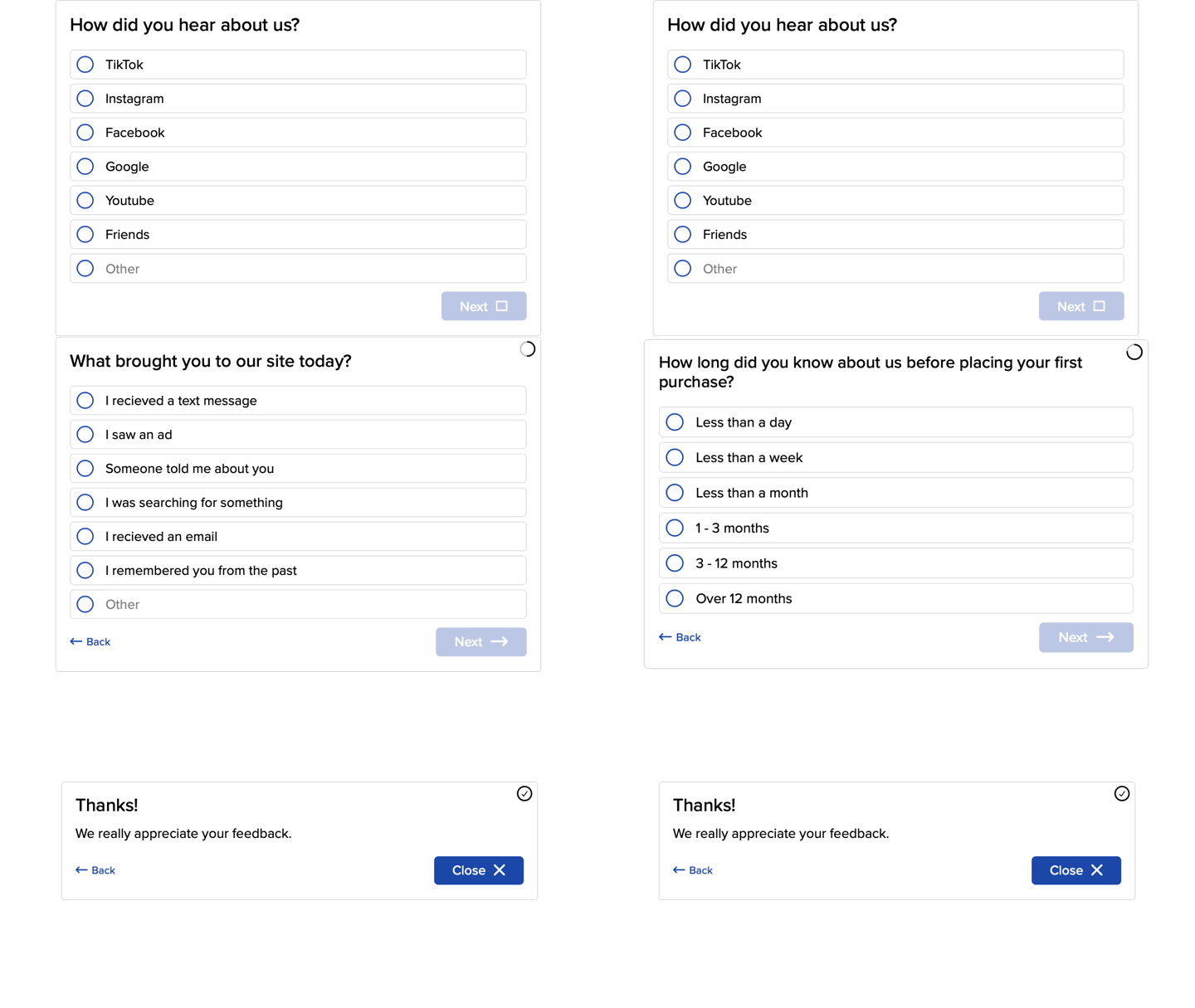
Here's a detailed guide on how to increase your post-purchase survey response rate.
Step 4: Add the Survey to Shopify
This is the final step in getting your Shopify post-purchase surveys going. And it's critical because how and when a customer receives the survey affects the response rate.
Option A: Thank You Page Survey
To set this up, you'll need to use a survey app like Affiniv.
Install the app, create and customize the survey, and enable the Thank You Page surveys from your app's settings. This should take under 10 minutes to set up.
Option B: Email/SMS-Based Survey
You can do this using all three methods discussed in Step 2.
Use workflow automation platforms (Zapier, Make) or email/SMS marketing apps (Klaviyo, Omnisend, Mailchimp) to trigger email/SMS surveys. Note, however, that only a few survey apps (Affiniv and Zigpoll) offer survey distribution through email and SMS.
Create the survey, update the email template, and set up the survey trigger condition (like 24–48 hours after delivery). Use cool-off conditions to avoid spamming frequent buyers and send automated reminders to non-respondents to increase the response rate.
Here is a detailed list of the best practices to send a survey via email.
Option C: WhatsApp-Based Survey
Affiniv is the only Shopify Survey App that offers survey distribution via WhatsApp. You can also do this through workflow automation platforms (ensure that they integrate with your WhatsApp provider before proceeding).
Follow these simple steps on Affiniv. Create the survey, get your WhatsApp content whitelisted with your provider, set up the survey trigger condition, and select distribution via WhatsApp.
All surveys created on Affiniv are mobile-friendly.
For Email, SMS, and WhatsApp surveys, timing is crucial to receive accurate feedback. For example, a CSAT for customer support should be sent immediately after the interaction, while a product feedback survey should be sent a few days after delivery.
Step 5: Analyze Feedback and Take Action
Steps 1 to 4 help you set up a good post-purchase survey. But your feedback loop remains incomplete unless you analyze the responses. And analyzing responses is only valuable if you take action.
You must identify recurring themes for both happy and unhappy customers. Dive deeper to convert them into actionable insights, such as process improvements, product iterations, and team training.
To draw actionable insights, you need a customer experience dashboard that provides:
- Real-time (and historical) scores for metrics like NPS, CSAT, and CES
- Customer and order properties, alongside each feedback
- Powerful segmentation for diving deep
- Summary of open-ended responses
- Keyword trends and alerts
- Capability to act from the dashboard and/or set up automated workflows
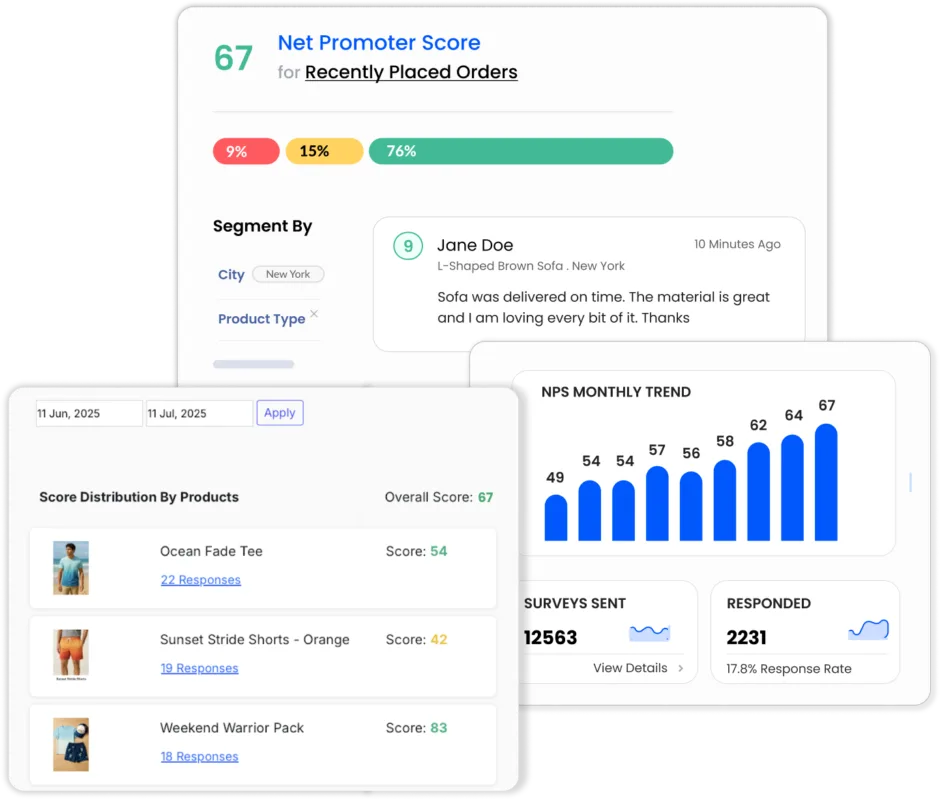
Affiniv Shopify Survey App comes with a pre-built analytics dashboard with all these capabilities.
With timely and accurate action, you should be able to prevent dissatisfied customers from churning out and convert satisfied customers into loyalists.
Best Practices for Shopify Post-Purchase Surveys
No matter which survey method you use, follow these best practices to achieve the highest quality and quantity of responses:
Follow these guidelines to avoid the most common biases in surveys — nonresponse bias and acquiescence bias.
How Affiniv Helps Shopify Stores Collect Post-Purchase Feedback
Affiniv is an all-in-one Shopify survey app that enables brands to fully automate post-purchase surveys without technical skills. Setting up takes only about 15 minutes. It includes survey creation, automated survey triggers on multiple channels, AI-powered analytics, and powerful integrations.
There are ready-to-use templates for NPS, CSAT, and CES surveys. You can also create custom surveys from scratch, modify the templates, add a thank-you message, and include logic flows in your survey. All surveys are mobile-friendly by design.
From Thank You Page surveys to Emails and SMS/WhatsApp surveys, Affiniv helps brands collect timely feedback. The real-time analytics dashboard and 25+ integrations empower Shopify stores to identify customer pain points and act faster.
Affiniv is super easy to set up, very simple to use, and runs on autopilot. This makes it a must-have app for Shopify stores to improve customer retention.
Final Thoughts
Creating a Shopify post-purchase survey is one of the easiest ways to improve customer experience and retention. Use it for customer feedback or for marketing attribution. Most commonly used touchpoints are the Thank You Page, Email, and SMS/WhatsApp. Follow survey best practices and choose the survey placement wisely, based on your survey goal.
Use an all-in-one no-code survey app like Affiniv for the fastest, easiest, and fully automated setup. Other ways to set up post-purchase surveys on Shopify are Email/SMS marketing apps like Klaviyo and workflow automation platforms like Zapier.
Set up a PPS once, automate it, and let real customer insights guide your growth.